Paper Charts
The route planned was going to include landing in capital cities and major airports. When planning a trip like this you have to think about landing fees/handling, air space considerations and airport procedures.
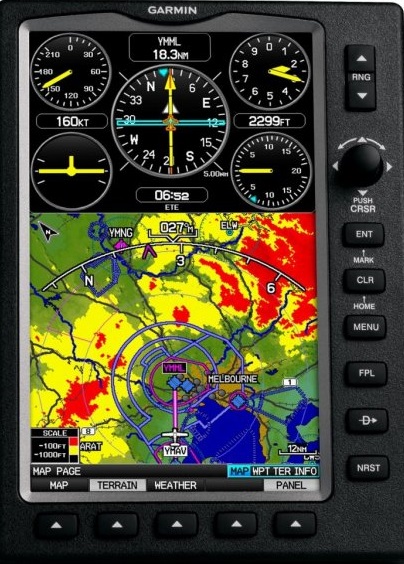
My first task was to obtain en-route charts, airport directories and the appropriate airport plates. I have a Garmin GPS 695 which is expensive but works like a dream.
That was a good place to start my initial research (that and the web of course). But, despite the brilliant advance of technological pilot tools I still like charts; paper charts that you can open up and see the ‘whole picture’. I guess I’m no different from those people who have a Kindle but still like the feel of a book.
I had all the French charts so my shopping list required those for : Italy, Croatia, Hungry, Austria, Czech Republic and Germany. Some of the countries in between may also be useful.
I found the following useful as sources for charts:
Italy; (these are produced by Avioportolano and like most charts (depending on scale) come in sections). I found them very useful and perfect for what I wanted. As I said above, the ability to open these up and see everything clearly in one ‘snap shot’ saves a lot of time. You can instantly see routes to avoid Class A Airspace (or any other specific type of airspace), avoid mountains, find VFR published routes. It is a matter of personal preference I guess but I would not be without the paper charts. Yes, electronic maps are great too but having to scroll/move sections in a screen is just not as efficient (I say).
Croatia; I had real difficulty in trying to purchase these charts. In the end I simply downloaded the pdf from the site (available on the provided link) and then sent them off to a poster printing service in the UK to reproduce (Hello Print). I got them printed in large format (A0) but actually, those are too big. I’d go for A1 next time I was going to do something like this).
Czech Republic; this is a great guide. It is a full directory for both Czech and Slovak Republics. It comes with a 1:500 000 chart. (The link provided is to a pilot supply site; in case they change their link here is the official link: (Czeck Aerodrome Database). It was probably overkill on my part to get this directory. If you were flying around Czeck Republic and visiting lots of difference airfields this is a ‘must have’. You may also be interested in the VFR guide for the Republic which you can view online or download the zip file: Czech VFR Manual
Austria; The text on the linked page is wrong. It refers to the Netherlands but actually the product shown is the correct chart.
Electronic Charts/Guides
As I mentioned above the Garmin is an invaluable tool. I have had it for a number of years and I wouldn’t be without it. I chose it carefully and selected it because of the following major factors:
- Matte Screen. I have an absolute hatred for glossy screens. Yes, they help sell electronic items because they look all shiny and sleek but they are impractical. I was going to mount this on the yoke; with a glossy screen you get either the impossibility to see the display because of glare or you look into it and just see yourself. It was difficult to find a GPS that I wanted that did have a matte screen
- Clunky Buttons and Dials. Again, I possess yet another hatred: touch screens. I’m busy in the cockpit and sometimes (quite regularly) it’s turbulent. With a touch screen a wrong ‘brush’ takes you off into some other view/feature and then you spend your time trying to get it back to where you started and repeat. I wanted something that I could operate almost without looking and something that had a positive feel to it.
- Reliable Sources. I have found the various directories that you can download on Garmin to be great. I love the ‘safe taxi’ feature on this unit. When you touch down the unit changes to safe taxi mode which displays with real clarity the airport taxiways and parking/facility areas
But, there are drawbacks to the unit:
- Price. It is ridiculously expensive. In fact, it is outrageously expensive.
- Weight. It is heavy. It is a solid unit but it is HEAVY.
- Battery. Quite some time passed while this unit was in my pilot case unused. When I wanted it to spark into action it wouldn’t. The battery had lost its charge and wouldn’t re-charge. I had to buy another and take out a mortgage to do so. The price of the batteries is just prohibitive. I had no choice. TIP: if you have one of these or are going to buy one then make sure you use it regularly or charge/discharge the battery regularly. I now have a monthly reminder in Outlook that tells me to switch it on and charge and/or discharge as necessary. I’m not saying you have to do this every month but the reminder to me serves as a useful hint.
- Is it necessary? Probably not. There are many other utilities out there that work very well (maybe better). But, for me, at the time I bought it, it was a life saver
The iPad:
I have avoided, like the plague, ever buying an iPad. I dislike Apple products. It’s a personal choice. My experience with them is that they suffer design faults and generally I end up frustrated with them. This could be because of ignorance on my part. It could be that I simply do not know how to get the best out of them. However, having said that, I don’t have the safe ‘learning difficulty’ with other products. But, there’s more to it than just that and below I will mention a couple of things that I consider annoyances.
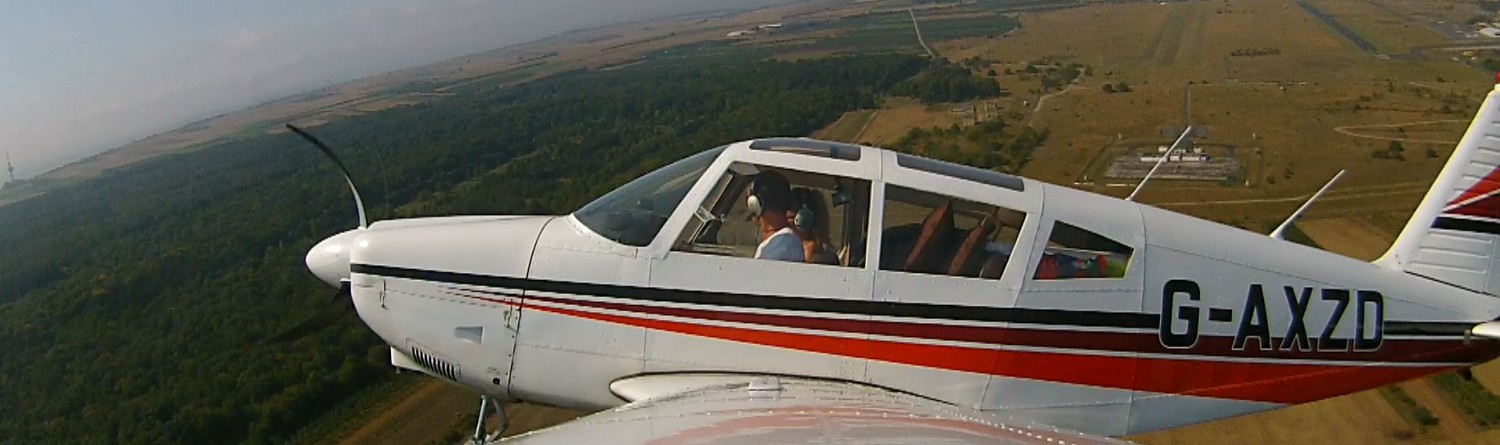
When I was planning my trip I put a post on the user group of G-AXZD. I asked if anyone had flown to the places I was considering. I met with a couple of fellow pilots and we had a chat. During that time I was introduced to SkyDemon. I had heard lots about it before but never actually seen it in action. I was totally impressed. It is relatively intuitive and has sensible functions and some hidden gems (like the on-screen ruler function). Of course, the demonstration to which I was treated was on an iPad. Urrgggh.
However, iPad or other type of tablet, it was clear that one of those had to be purchased in order to properly use SkyDemon (SD) in flight. I bough an iPad. I do not honestly think I will use it for anything other than SD. Ok, I might. But not much. I don’t have Facebook and I don’t want it. I don’t go in for FaceTime and that ‘stuff’ so the iPad use will be limited. If I want to surf the web or write I’ll use my beautiful Samsung New Series 9 notebook…what a joy…and, matte screen. I digress.
iPad Warning!!! Before purchasing I did some research. Obviously not enough. It was clear in my mind that while flying and navigating using the iPad the source of the information was not coming from wifi nor a cellular network. My Garmin (previously discussed) does not have wifi and it does not have a cellular network connection. It works. Therefore, the information is coming from gps satellites. My research of using SD with the iPad was that you DO NOT need wifi and DO NOT need cellular. That was obvious to me but was confirmed when I was conducting my research. Why is this important? It’s important because I was having to decide whether to buy an iPad with cellular or without. There is a fair difference in price. I decided against cellular. WRONG DECISION (sort of but the right one in the end).
While you do not need cellular connection to use SD on the iPad the iPad model that does not have cellular DOES NOT WORK USING GPS. This is by far my most important tip for those of you considering purchasing an iPad for this purpose. From what I have researched it seems Apple (if the Apple wisdom) use different types of chips in the different models.
But, there is a solution and actually it’s a better option in my opinion than getting the cellular model. You buy an external gps receiver that links up to the iPad. Some of these are cheaper than the price difference between cellular/non-cellular iPad models. Getting an iPad with a separate gps is a better option I believe, because:
- you get much better gps reception
- depending on what type of gps receiver you get, you can have the iPad and the receiver in different places. This means that you can have the iPad out of sunlight which (a) avoids screen glare issues and (b) avoids over-hearing (more on this below)
- you can use the gps receiver with other equipment
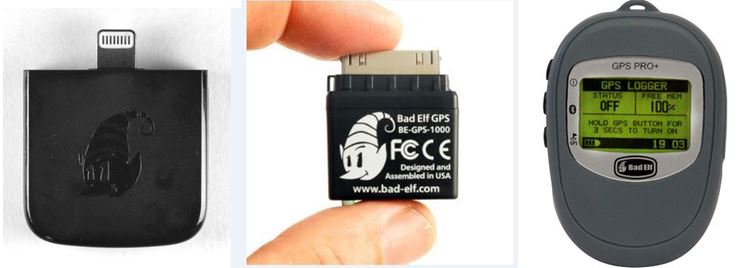
So, which gps receiver should you buy? I don’t know enough about the various models to offer advice. I can only offer my opinion on two different models from the same manufacturer: Bad Elf
Basically there are two types of gps receiver from Bad Elf: (a) a plug-in version and (b) a bluetooth version. I decided on bluetooth rather than plug-in for the following reasons:
- you can use it with other devices that have bluetooth and you are not reliant on a device that has the same type of plug connector
- you can have the receiver separate form the device. This is a great function. In fact, it’s a deciding factor
- you can share it with others. Other users can login to the receiver and receive gps data. It means that navigating others on the flight/drive/walk/hike/cycle can use it
- BUT…MOST IMPORTANT….the iPad has ONE socket connection. If you get the plug-in Bad Elf, how are you going to power the iPad if there is insufficient battery? I’m so pleased this dawned on me before I purchased.
So, the long and the short of it is that now I can have the iPad anywhere (restricted only by the cigarette lighter socket in the plane if the iPad needs power) away from sun and have the Bad Elf located in the best reception area.
Below are the different types of Bad Elf GPS receivers
 2015 Euro Flight